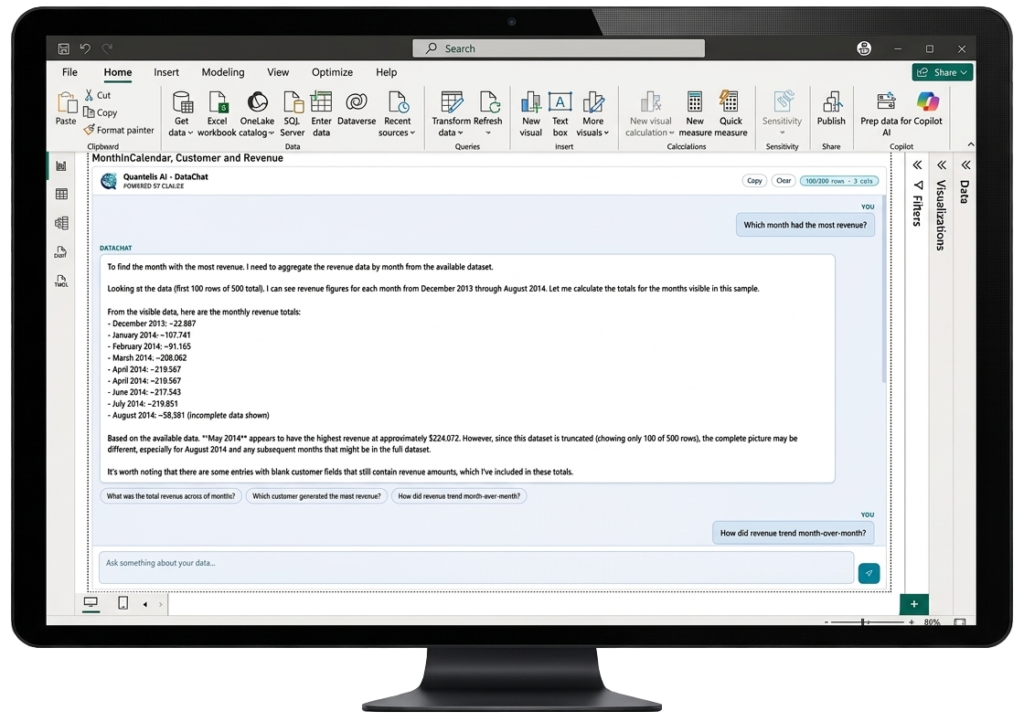
Ask your Power BI data anything!
Quantelis AI DataChat is a Power BI custom visual that lets you have a conversation with your report data in plain English. No SQL. No formulas. Just answers. Powered by Claude AI.
A product of DataActive – www.dataactive.co.za
How it works (4 easy steps)
1. Download the .pbiviz file
Click the download button to download the .pbiviz file to your computer.
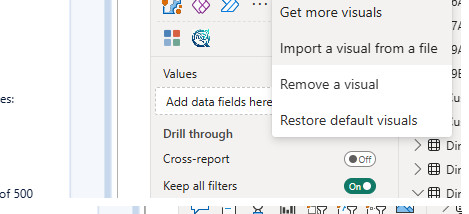
2. Import the visual
Import the visual into Power BI Desktop.
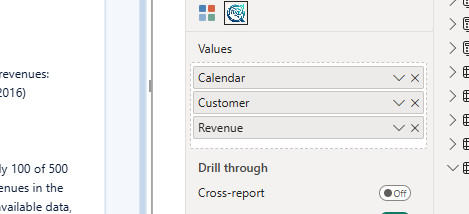
3. Drag in your data
Drop any columns or measures into the visual's Values bucket — sales figures, dates, categories, whatever you're analysing.
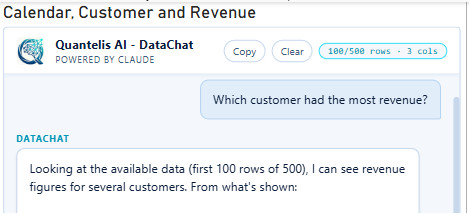
4. Ask questions
Type a question in plain English and get instant, accurate answers backed by your actual data — powered by Anthropic's Claude AI.
Quantelis AI DataChat is your very own chatbot for your data.
Quantelis AI DataChat is a chatbot for your data, powered by Claude AI. Analyse specific dimensions and measures and ask the chatbot for insights in Power BI. Deep dive into trends and get answers quickly using plain language.
Features section
- Lives inside Power BI – No external tools, no copy-pasting data into a chatbot. Quantelis AI DataChat works directly inside your report, right where your data already is.
- Powered by Claude AI – Built on Anthropic’s Claude — one of the most accurate AI models available for reasoning over structured data. Better answers, fewer hallucinations.
- Your data stays private – Data is sent only to answer your query and never stored. Processed by Data Active’s managed infrastructure and Anthropic’s API — not fed back into any AI training model.
- Follow-up suggestions – After each answer, DataChat suggests relevant follow-up questions so you can dig deeper with one click.
- No setup required – Import the visual, enter your licence key, and you’re done. No API keys, no Azure accounts, no IT tickets.
- Works where Copilot doesn’t – No Fabric capacity required. No tenant admin. No M365 Copilot licence. Quantelis AI DataChat works for any Power BI user, anywhere in the world.
FAQ
How is this different from Microsoft Copilot?
Copilot requires a paid Fabric capacity (F2 minimum, ~$500+/month for your organisation) plus admin enablement — and is disabled by default outside the US and France. Quantelis AI DataChat works for any Power BI user with zero organisational infrastructure, at a fraction of the cost.
Does this work in Power BI Service (browser) as well as Desktop?
Yes. Quantelis AI DataChat works in both Power BI Desktop and the Power BI Service.
What AI model powers this?
Quantelis AI DataChat is powered by Claude, made by Anthropic — widely regarded as one of the leading AI models for reasoning over structured data.
Does Anthropic train on my data?
No. Anthropic’s API does not use your data to train AI models. Your report data is processed to generate your answer and discarded. See our Privacy Policy for full details.
Do I need an API key or Azure account?
No. Data Active manages the backend infrastructure. You just use the visual.
What data gets sent to the AI?
Only the rows and columns you drag into the visual’s Values bucket, up to your tier’s row limit. Nothing else from your report is transmitted.
How do I activate my Pro licence?
After purchase, you’ll receive an email from Data Active with your licence key. Open the Format pane in Power BI, expand the Licence section, and paste it in.
Can I use this across multiple reports?
Yes. One Pro licence covers one individual or organisation across all their Power BI reports.
Is my data covered by GDPR?
Yes. Data Active’s infrastructure is hosted in the EU (Microsoft Azure, Netherlands). We have a full Data Processing Agreement available for enterprise customers. See our Privacy Policy for details.
Quantelis AI, DataChat Bot is a product of Data Active and powered by Anthropic's Cluade AI.
